Many travellers still use a notes app, screenshots, booking emails and a spreadsheet as their main trip planner. That approach usually works until the trip becomes even slightly more complex. One flight time changes, one hotel booking email is buried in your inbox, or you want to compare activities across several days, and suddenly the whole travel plan feels fragmented.
A good trip planner app should not just store information. It should turn booking information into a practical trip timeline, reduce manual admin, and help you move from planning into action. That is where aviaroute is especially useful. Instead of manually rebuilding your itinerary line by line, you can upload an itinerary image or PDF and let aviaroute organise the trip for you.
Upload your itinerary image or PDF into a travel itinerary app
The most effective way to use aviaroute is to begin with the documents you already have. If you have an airline confirmation, a holiday booking summary, a hotel PDF, or even a screenshot of your itinerary, aviaroute can use that file to map out the structure of your trip. That means your flights and stays are pulled into one place without the usual manual copy-and-paste routine.
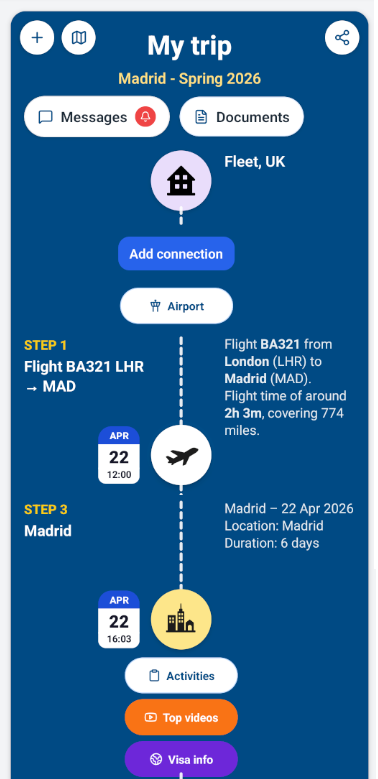
This matters because a trip itinerary planner is only useful if it stays current. The less manual effort it takes to start a trip, the more likely you are to keep using the app through the rest of your planning process.
Use one trip planner to organise flights and stays
Once the trip is created, aviaroute gives you a clear trip timeline so you can see how the whole journey fits together. Flights, connections, airports and stays are no longer spread across separate apps. You can review the travel sequence in one place and understand how each part of the trip links to the next.
This is one of the main reasons a trip planner is better than a folder full of travel screenshots. It becomes much easier to spot long layovers, missing connections, or accommodation details that need attention before you travel. Instead of searching for information, you are working from an organised plan.
Share the trip with fellow travellers so everyone works from the same plan
A trip often becomes harder to manage when each traveller holds different pieces of information. One person has the flight screenshot, another has the hotel confirmation, and someone else is still searching old messages for the meeting point. aviaroute is more effective when you use it as a shared reference point instead of a personal notes folder.
That is especially useful for couples, families and small groups. When the trip structure is visible in one place, fellow travellers can stay aligned on flights, stays, documents and the running plan for the trip. In practice, sharing the trip reduces the usual back-and-forth and makes last-minute decisions easier.
Use a holiday planner app after booking, not just before booking
A lot of travel tools help only with inspiration. They act more like a destination finder, a trip planner template, or a lightweight road trip planner board. aviaroute goes further because it remains useful after you have booked. As a holiday planner app, it keeps documents, messages, transport context and day-level planning all stay connected to the same trip.
That is a major practical difference. A trip planning app becomes more valuable when it still saves you time after bookings are confirmed, because that is when the admin usually starts to build up.
Set your preferences so the trip planning app suggests better activities
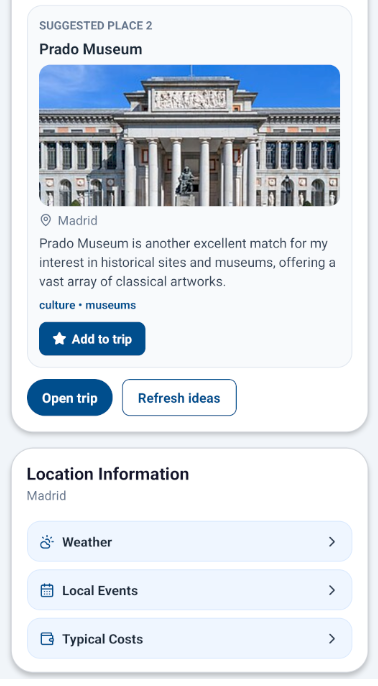
Another strong way to use aviaroute effectively is to spend a minute on your travel preferences. If you tell the app what you enjoy, such as museums, food experiences, place style or budget, aviaroute can suggest activities that fit both your destination and your preferences.
This is where the app moves beyond basic itinerary storage and starts acting like a more intelligent trip planner app and travel itinerary app. You are not just storing what you have already booked. You are also using the trip context to discover what to do next.
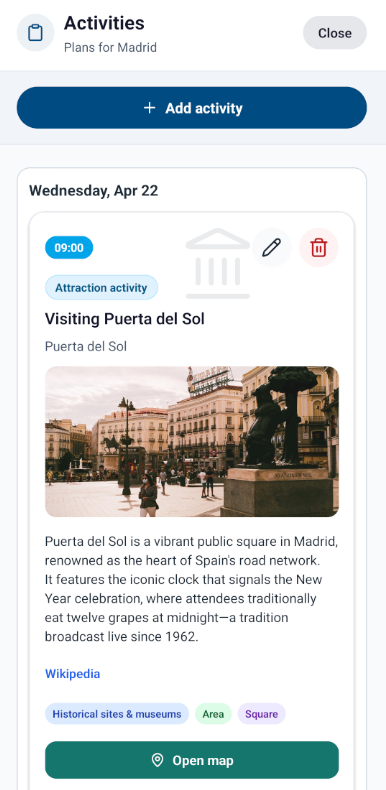
In practical terms, that means less searching through generic lists and less second-guessing. If you are planning a city break, aviaroute can help you move from “I know where I am going” to “I know what fits this trip.”
Refresh ideas and add them straight into the trip
Good planning is iterative. You might want a quieter museum day, a more food-focused afternoon, or a better option for a free evening. aviaroute makes this easier because you can refresh ideas and add useful suggestions straight into the trip itself instead of rebuilding a plan elsewhere.
That workflow is particularly helpful when you want a trip itinerary planner that does more than hold static notes. It lets you compare options inside the actual trip context and keep the final plan organised.
Keep planning simple with one travel planner app
The most effective way to use any trip planning app is to reduce the number of places where trip information lives. With aviaroute, the aim is not to create another layer of admin. It is to replace scattered files and messages with one structured trip record.
- Upload itinerary PDFs or booking screenshots instead of copying details manually.
- Check the trip timeline to confirm flights, stays and sequence.
- Use saved preferences to get more relevant activity suggestions.
- Add useful ideas straight into the trip so the plan stays in one place.
- Return to the same trip whenever plans change instead of starting over.
Why aviaroute works well as a trip planner app
The reason aviaroute stands out is that it connects the most time-consuming parts of travel planning. It helps you start quickly with an itinerary upload, keeps your flights and stays organised in a clear structure, and then supports the next stage with preference-based activity planning.
For travellers looking for a practical trip planner, trip itinerary planner, travel itinerary app or even a more flexible alternative to a static trip planner template, that combination is what makes the app effective. It is not just about inspiration and it is not just about storage. It is about turning trip information into a plan you can actually use.
FAQ: choosing the best trip planning app
What should a trip planner app do?
A useful trip planner app should organise flights, stays, documents and activities in one place. It should also reduce manual admin rather than create more of it.
Can a travel itinerary app read booking screenshots or PDFs?
aviaroute is designed for exactly that workflow. You can upload an itinerary image or PDF and use it to structure the trip instead of typing every detail manually.
Is aviaroute only for solo travellers?
No. One of the practical benefits is being able to share the trip with fellow travellers so everyone can work from the same plan for flights, stays and activities.
Can a holiday planner app also help with activities?
Yes. In aviaroute, saved travel preferences help shape activity suggestions, so the app can recommend places that better match the type of trip you want.
Plan your next trip in aviaroute
If you want a simpler way to organise travel, start by uploading your itinerary image or PDF into aviaroute and let the app build your trip structure. Then use your saved preferences to find activities that fit the kind of trip you actually want to take.
Use aviaroute